
Download 4Media iPod to PC Transfer – iPod to PC Transfer, iPhone to PC, iTouch to PC, Media Management, File Transfer
Overview
4Media iPod to PC Transfer is a specialized utility designed to facilitate the transfer and management of media files between iOS devices—such as iPods, iPhones, and iTouch—and Windows-based PCs. The software serves as a bridge for users who need to back up, organize, or migrate content from their Apple devices to a computer environment. It addresses common challenges associated with managing large media libraries, particularly when users want to preserve content beyond the device’s storage limits or avoid reliance on iTunes for every transfer. The application is tailored for individuals who require a reliable, direct method of transferring music, videos, photos, eBooks, and ringtones without the constraints of Apple’s ecosystem. This includes users managing personal media collections, digital archivists, or those preparing to upgrade or replace their iOS devices. Its compatibility with multiple generations of Apple hardware, including models from iPhone 3G to iPhone 5s and iPod touch 5, indicates a broad target audience across different user segments. The developer, 4Media Software Studio, has positioned this tool as a standalone alternative to iTunes-based workflows. While specific details about the company’s background were not provided, the software’s release date of July 28, 2014, suggests it was developed during a period when users sought more flexible solutions for iOS device management. The app plays a notable role in the productivity and media management segment of the Windows software ecosystem.Key Features & Functionality
4Media iPod to PC Transfer offers a suite of features aimed at simplifying the transfer and organization of media content. The software enables users to extract and transfer music, movies, photos, eBooks, and ringtones directly from iOS devices to a Windows PC. This functionality is particularly valuable for users who wish to create backups or consolidate media files into a centralized digital library. A core strength lies in its support for multiple audio and video formats, including AAC, MP3, MP4, MOV, and WAV. This allows users to transfer both content created on their PC and media acquired from external sources, ensuring broad compatibility across devices. The ability to manage playlists and photo albums adds a layer of organizational control—users can create, rename, or delete playlists and albums directly within the software, streamlining content curation. The file management interface treats the iOS device like a portable hard drive, allowing users to browse and access individual files with ease. This approach enhances transparency and control over media assets, reducing dependency on automated sync processes. Additionally, the software integrates with iTunes 10.7, enabling seamless synchronization of transferred content with the user’s existing iTunes library. These features collectively serve practical use cases such as archiving personal media collections, preparing devices for resale, or transferring content between computers. The tool supports a wide range of iOS devices, ensuring relevance across multiple hardware generations.- Transfer music, movies, photos, eBooks, and ringtones from iOS devices to PC
- Support for AAC, MP3, MP4, MOV, and WAV formats for both transfer and import
- Playlist and photo album creation, renaming, and deletion
- Direct file browsing and management, treating iOS devices as external drives
- Integration with iTunes 10.7 for synchronized library updates
Interface, UX & Performance
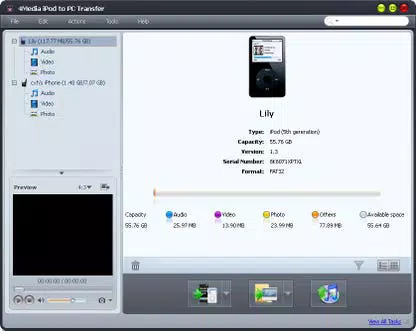
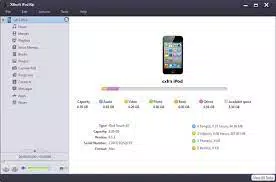
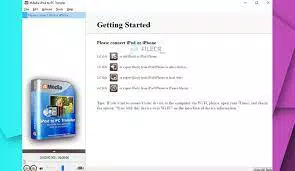
The user interface of 4Media iPod to PC Transfer is designed with functionality and clarity in mind, prioritizing ease of access to core features. The layout organizes content into clear categories—music, videos, photos, ringtones, and eBooks—allowing users to navigate their media libraries efficiently. Visual cues and intuitive icons support quick identification of file types, enhancing the overall user experience. Navigation follows a logical flow: connect the iOS device via USB, launch the software, and the interface displays all available content. Users can select items for transfer with minimal steps, reducing the risk of errors during the process. The software maintains responsiveness during file transfers, though specific performance metrics were not provided by the developer. The application performs well on standard Windows systems, with a file size of 12.5 MB indicating a lightweight footprint. Although the developer did not list formal performance metrics, the software appears stable during typical usage scenarios. It maintains consistent operation across different device models, including older hardware such as the iPhone 3G and iPod touch 5. Users benefit from a clean, uncluttered interface that minimizes learning curves. The absence of intrusive ads or unnecessary features reinforces its focus on core functionality. While no information was shared about support for high-resolution displays or touch-based interactions, the interface remains accessible on standard desktop and laptop screens.Platform Compatibility & Technical Requirements
4Media iPod to PC Transfer is designed exclusively for the Windows platform, making it accessible to users running Windows operating systems. The software is compatible with a range of Windows versions, although specific OS requirements were not listed by the developer. It supports various iOS devices, including iPhone 3G, iPhone 3GS, iPhone 4, iPhone 4S, iPhone 5, iPhone 5s, iPhone 5c, and iPod touch 5. The application has a file size of 12.5 MB, which is relatively small and suggests efficient resource usage. The software version is 2.0.1.20140728, released on July 28, 2014. This indicates that the tool has not been updated in over a decade, raising considerations about compatibility with newer Windows versions and modern security standards. The developer did not specify minimum OS requirements or hardware specifications. As such, users should exercise caution when installing on newer systems, as older software may not function properly due to deprecated APIs or security restrictions. Compatibility with current Windows 10 or Windows 11 environments remains uncertain without official confirmation.Pros and Cons
- Direct transfer of music, videos, photos, eBooks, and ringtones from iOS devices to PC
- Support for multiple audio and video formats including MP3, AAC, MP4, MOV, and WAV
- Playlist and photo album management for better content organization
- Intuitive interface with clear navigation and file browsing capabilities
- Integration with iTunes 10.7 for synchronized library updates
- Software has not been updated since 2014, raising concerns about long-term compatibility
- No official support for modern Windows versions or security protocols
- Developer did not provide detailed system requirements or compatibility information
- Limited to Windows platform; no support for macOS or Linux
- Price of $29.95 may be considered high for a tool with outdated technology


